|
|
 |
|
|
|---|
|
|
|
|
|
|---|
Wall Charts
How to order Wall Charts
1) Browse to, and logon to, the following web site:
https://portal-dtna.prd.freightliner.com/portal/
2) At the 'DTNA Portal' web site main page, click
on the hamburger menu icon ( ) in the
upper left hand corner of the page to the right of 'DTNA
Portal' and then select 'Service' on the
left hand side of the page:
) in the
upper left hand corner of the page to the right of 'DTNA
Portal' and then select 'Service' on the
left hand side of the page:

3) On the 'Service' page, click on the 'Order Literature (Warranty Labels and Chassis Service)':

4) At the 'DTNA Publications' web site, expand the make of vehcile you are wanting to order a wall chart for, then click on the 'Wiring Wall Charts' link:

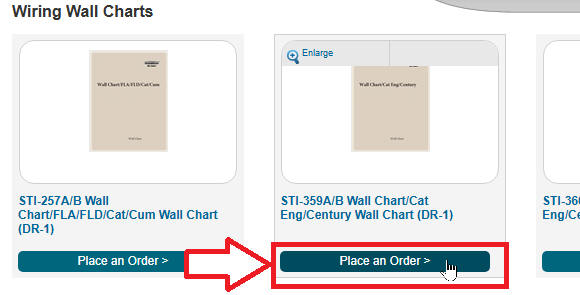
5) At the 'Wiring Wall Charts' page, click on the 'Place an Order >' link below the wall chart that you are wanting to order:
6) At the order placement web page, click the 'Add to Cart' link in the lower right-hand corner of the page:

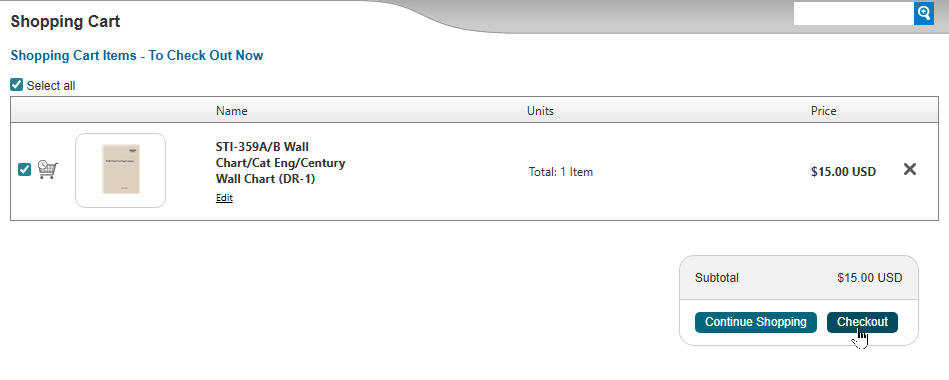
7) At the 'Shopping Cart' page, click the 'Checkout' link in the lower right-hand corner of the page:
8) At the 'Checkout - Order Summary' page, click on the 'Next >' link in the lower right-hand corner of the page:

9) * Continue on with the ordering process.
